The problem a vitamin tracker app is meant to solve
Most skipped supplements are not a motivation problem. The bottles live in different rooms, the plan lives in a chat thread, and the only record is a feeling that you usually take them. A note titled vitamins does not know which bottle is vitamin D, which is magnesium, or which one you already doubled because you could not remember the first dose.
A clock alarm does not fix that. An alert that says vitamins at 8:00 assumes you eat at 8:00. Vitamin D wants a meal with some fat. Iron often wants distance from calcium, tea, and a large magnesium dose taken at the same moment. If the tool cannot say after breakfast, you will fight it, and the fight looks like a missed day.
A vitamin tracking app should answer a smaller question than whether you are healthy. It should answer what you took, with which meal, and whether this course is still running. VitaminHelper stays on that question. It is educational software for a habit, not a diagnosis and not a chart your clinician keeps.
How VitaminHelper helps you track vitamin intake
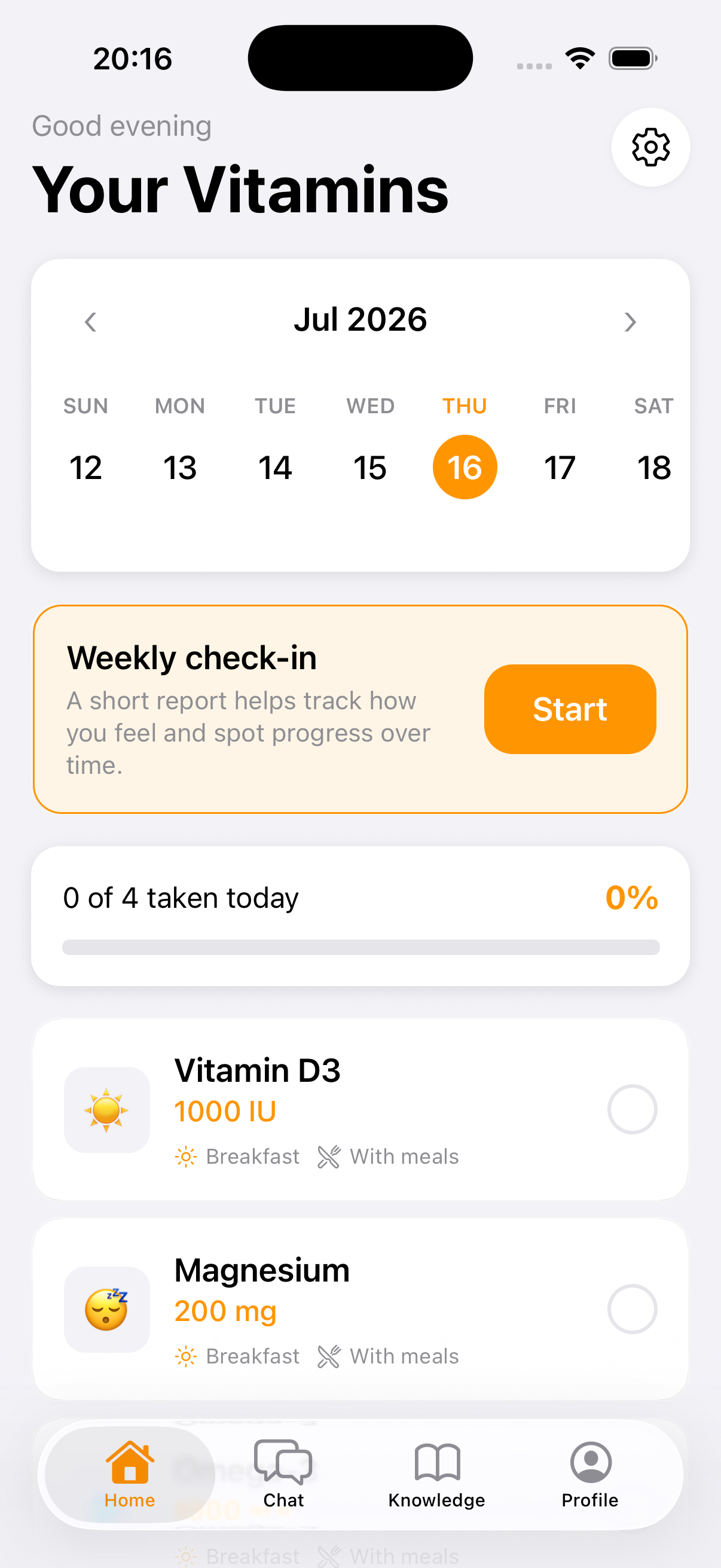
You set four anchors once: breakfast, lunch, dinner, and bedtime. Each item in the daily plan inherits a slot — before, during, or after that meal. The daily vitamin tracker then shows today's list in the order you actually live, not as a pile of unrelated alarms. Checking a row is the whole interaction. The dose is either done or it is not.
The log keeps history, so a missed morning is still visible at dinner. That matters when the honest move is to skip, not to double. Course length is part of the record too. A two-week trial, a month, or an ongoing stack can end, and the tracker can remind you that a course is over, not only that a dose is due. Streaks and a calendar sit next to the checkmarks so a bad week is something you can see, not a vague sense that you failed.
Weekly check-ins for mood, energy, and sleep sit beside the log. They are not a score of your worth and not a clinical result. They show patterns: the dinner dose that never happens on late workdays, or a bedtime slot that rings while you are still out. You can read the pattern and move the slot. A guide of 50+ vitamins and minerals is there when you want food sources and timing context, and anything you read can be added to the tracker instead of retyped from the label.
What this supplement tracker app keeps
The point of the feature list is a short weekday, not a dashboard. If nine checkboxes are still staring at you on Friday, the list was too long. VitaminHelper is built so the bottles you take every day and the bottles you are only trying this month can live in one course without pretending they are the same commitment.
These are the pieces the daily log actually uses. None of them is a health score. They are the memory a cabinet does not have.
- Names and doses for each supplement, including a complex plus a standalone bottle so overlapping minerals stay visible
- A meal slot for every item: before, during, or after breakfast, lunch, dinner, or bedtime
- A daily check-off, with streaks and calendar history behind it
- A course length, so a trial can end instead of running forever by accident
- Weekly notes for mood, energy, and sleep next to what you marked
- A guide entry you can send into the tracker when you do not want to retype the bottle
Hints such as vitamin D often discussed together with K2 are suggestions you can review. They are not a prescription. If a prescribed medicine already has its own schedule, keep that schedule with the person who wrote it. The supplement tracker is for the bottles you chose to log.
How to use the tracker
You can start from the bottles on the counter, or from a plan you already saved. Some of the tracker works without an account. Signing in is what syncs the log when you change phones. The first session is an inventory, not a personality test.
Do it in this order. Each step is small on purpose. A tracker you finish on a Tuesday is worth more than a perfect setup you abandon on Wednesday.
Add what you already take
Write every name: the multivitamin, vitamin D, magnesium, omega-3, the gummy you bought for hair. If the multi already contains a mineral, a second bottle of that mineral is not automatically an upgrade. Collapse the duplicates before you add another row. The tracker can only show a double if both bottles are actually in the course.
Give each dose a meal
Fat-soluble vitamins belong with food for most people who follow the label. A B-complex that bothers your sleep can move earlier in the day. Magnesium often lands at dinner or before sleep. Those are patterns, not rules for your body. The slot you pick is before, during, or after the meal time you already set. Change the meal clock when your real breakfast moves. Do not invent an 8:00 you never eat.
Check the day off, including the misses
Open today's list and mark what you took. Leave the rest unmarked. The history is only useful if a miss stays a miss. When you travel and meals slide, change the four anchors for those days instead of silencing every notification and reconstructing the week from memory.
Look at the week, not a single morning
The weekly check-in is where the log meets real life. If Thursday dinner is always empty, the slot is in the wrong hour or the bottle is in the wrong room. Adjust it. If a course end date arrives, decide whether the bottle continues. The app will not decide that for you, and it should not.
What changes when you track vitamin intake every day
Regular logging is not a virtue project. It stops two expensive mistakes: taking the same mineral twice because a complex and a single-ingredient bottle overlap, and quitting a stack you cannot remember taking. A month of checkmarks is a calmer conversation than a story that starts with I think. You are showing a list, not reconstructing a cabinet.
It also makes timing visible. You can see that vitamin D is attached to breakfast and magnesium to the evening, which is the whole reason a meal-based log beats one morning alarm named vitamins. When someone suggests adding K2 or omega-3, you are looking at what is already there. The guide on the home page is the same 50+ entries, if you want the food-source context before you add a row.
The habit stays small. VitaminHelper is free to try on iPhone and Android, and the tracker is the part you can use before you ever open the coach. A supplement reminder app fires when the slot is due. This page is the record of what you confirmed. If you want the list drafted for you, the AI vitamin coach can save a course into the same tracker in one tap. None of that replaces advice from a qualified professional.
Related guides
Questions about tracking vitamins
What is a vitamin tracking app?
A vitamin tracking app is a log of the supplements you take: the name, the dose, the meal it belongs to, and whether you marked it today. VitaminHelper is that log, plus meal-timed reminders and a vitamin guide. It is not a food diary and not a medical record. You still decide what belongs on the list. A clinician still owns prescriptions and the interpretation of lab tests.
Can I track more than one supplement?
Yes. A course can hold a multivitamin, vitamin D, magnesium, omega-3, and whatever else you actually take. Each row gets its own meal slot, so breakfast and bedtime do not collapse into one checkbox labeled vitamins. If the list gets long, split what you take every day from what you are only trying this month. The tracker is more useful when the weekday list is short enough to finish.
How is a tracker different from a reminder?
A reminder tells you a dose is due. A tracker records whether it happened and keeps the history. VitaminHelper does both. The supplement reminder app page is about the notification. Stay here if the problem is that you cannot tell, at the end of the week, what you took. You do not have to pick one and delete the other.
Is the tracker a medical record?
No. Intake logs, courses, and weekly mood, energy, and sleep notes are there so you can see a habit. They are not a diagnosis, a treatment plan, or a substitute for a clinician's chart. Do not stop a prescribed medicine because a vitamin log looks tidy. If you show the screen to a professional, treat it as your memory, not as their test result.
Do I need an account to log doses?
You can use some of VitaminHelper without signing in. An account is what syncs the tracker across devices, and it is required for AI features and lab upload. The privacy policy describes what is stored. The daily check-off itself is available as part of the free app on iPhone and Android.
Try VitaminHelper
Put today's bottles into a daily vitamin tracker, mark what you actually took, and keep the course next to the meals you already eat.
This page is for general information. VitaminHelper is not a medical device and does not provide diagnosis or treatment. Talk to a qualified healthcare professional before starting, stopping, or changing any supplement or medication.