Why a vitamin reminder app is not another alarm
A generic notification is good at one job: making a sound at a clock time. That is enough for a single tablet with no food rule. It falls apart for a stack. Three bottles at three clock times become three alarms that do not know they belong to the same breakfast. You dismiss one in a meeting and the others have no idea the meal moved.
Supplements also have food rules that a medication-style alarm ignores. Vitamin D is usually taken with a meal that contains some fat. Iron is often kept away from calcium, tea, and a large magnesium dose in the same swallow. Magnesium itself often sits later in the day. If the reminder cannot express after lunch, you will silence it, and silencing it is how a week disappears.
The missed dose is the expensive one, not because every skip is dangerous, but because you stop knowing what happened. People double a morning capsule at night, or they quit the bottle they cannot remember taking. A daily supplement reminder exists so the question stays small: this slot, this dose, taken or not.
How reminders work in VitaminHelper
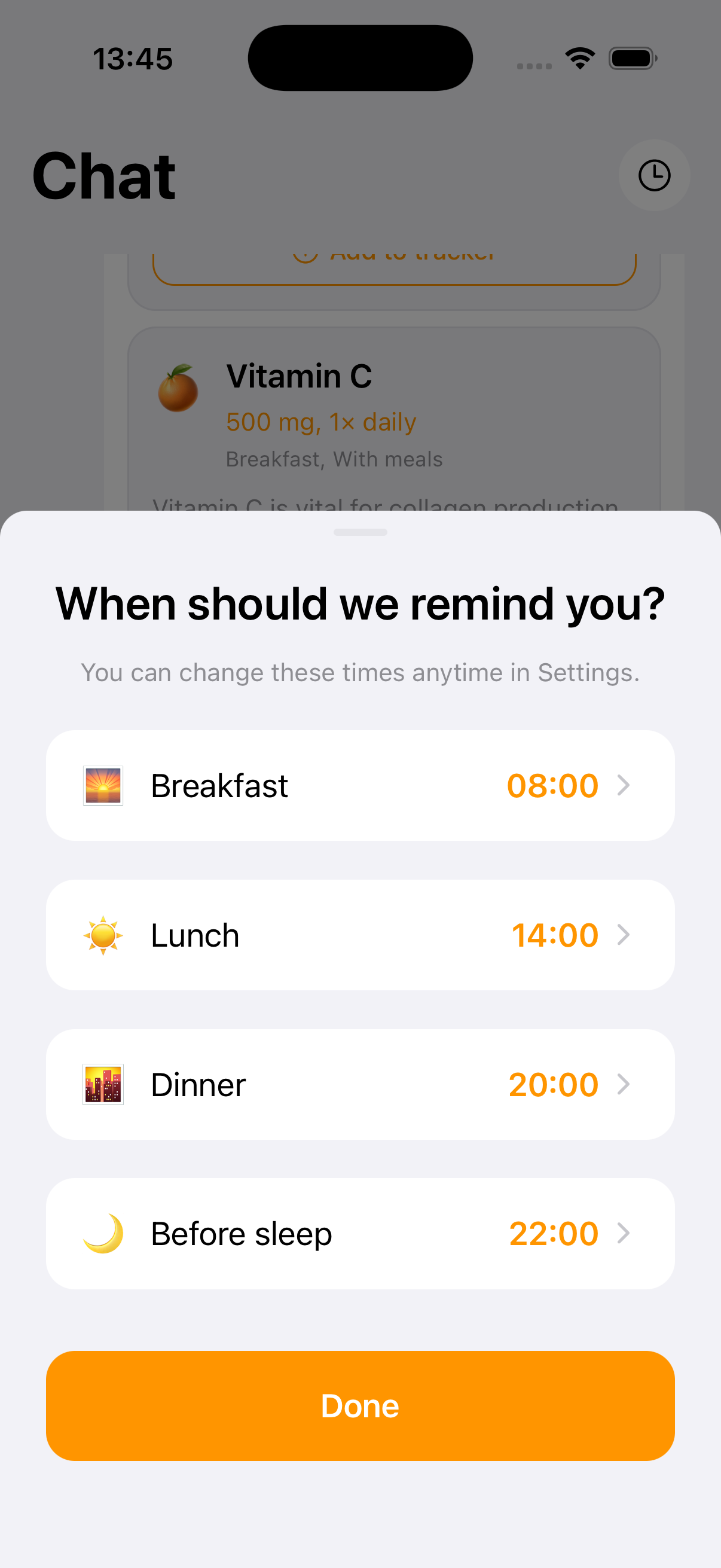
You set breakfast, lunch, dinner, and bedtime once. Those four clocks are the schedule. Each supplement then takes a place relative to one of them: before, during, or after. When lunch moves from 12:30 to 14:00, you move lunch. You do not rebuild a separate alarm for vitamin D, K2, and omega-3 if they share that meal.
The notification is tied to the row in your course, not to a vague label. You can see which dose is due, and the vitamin tracker is where you mark it taken. A reminder without a log only proves the phone rang. A log without a reminder depends on you remembering to open the app. VitaminHelper keeps both, because the habit fails at whichever half you skip.
Course length is part of the reminder story too. A bottle you meant to try for a month should not ping forever. The app can tell you a course is ending, not only that today's dose is due. That is a different nag from a repeating alarm, and it is the one that keeps a temporary stack from becoming furniture.
What you can set in a vitamin schedule app
The settings are deliberately few. A supplement schedule tracker that asks for a new clock on every bottle recreates the pile of alarms you already have. VitaminHelper asks for the meals first, then hangs each dose on a meal you already understand.
- Four anchors: breakfast, lunch, dinner, and bedtime, set to the hours you actually eat and sleep
- A before, during, or after slot for each supplement in the course
- Separate rows, so magnesium at night does not hide inside a morning checkbox
- A course end, so a short trial can stop reminding you
- A daily list you confirm, which is what turns the notification into a record
You can keep a prescribed medicine on the schedule your clinician gave you. Do not move that clock because a vitamin app suggested a different meal. The reminder here is for the supplements you chose to put in the course. If food timing for a drug is already specified, that instruction wins.
Who a daily supplement reminder helps
It helps when the stack is more than one bottle. A single tablet with breakfast does not need a system. Vitamin D with food, magnesium in the evening, and an omega-3 you keep forgetting at lunch do. The moment two items want different meals, a single alarm named vitamins is lying to you.
It helps when your meals move. Shift work, travel, a late breakfast, a workout that replaces lunch: the clock on the bottle label did not know about your Tuesday. Moving four anchors is a smaller edit than retiming every notification by hand. People who eat at roughly the same hours can still use it. The slots simply stay put.
It is a poor fit if you want a clinical adherence program for prescriptions, or if you want the app to invent the regimen. VitaminHelper will not decide your doses. The AI vitamin coach can draft an educational plan you choose to save. The reminder only rings for what is already in the course. That boundary is the point.
How to build your own intake schedule
Start from the day you already have, not from an ideal morning routine in a video. Write down when you actually eat and when you actually go to sleep. Those times are the only clocks worth saving. A beautiful 7:00 reminder is useless if you leave the house at 6:40 without food.
Then attach bottles to those meals one at a time. The guide on VitaminHelper can remind you which nutrients are commonly taken with food, but the label on your bottle and a clinician's instruction outrank a general tip. Keep the list short enough that a weekday can finish it.
Set the four meal times
Open reminders and set breakfast, lunch, dinner, and bedtime to your real hours. If you skip lunch, do not invent one. Put the midday dose on the meal you do eat, or leave that anchor unused. The schedule should describe your day, not scold it.
Place each supplement on a slot
Vitamin D, K2, and omega-3 can share a meal if that is the routine you chose and the labels allow it. Magnesium can sit before sleep. Iron, if you take it, often wants its own distance from calcium and tea. Give that distance a slot instead of hoping you remember it at the sink.
Confirm the dose when it rings
A dismissed notification is not a taken dose. Mark the row in the tracker when the capsule is actually swallowed. If you missed it, leave it open. The next reminder is more honest when yesterday's miss is still visible.
Move the anchors when the week changes
Travel, a deadline, a holiday breakfast at noon: edit the four times for those days. Do not turn notifications off and promise yourself you will remember. The supplement schedule tracker is only useful if it is allowed to follow the week you are having.
Related guides
Questions about vitamin reminders
What is a supplement reminder app?
It is a way to be told when a dose in your course is due, using the meals you actually eat. VitaminHelper lets you set breakfast, lunch, dinner, and bedtime, then place each supplement before, during, or after one of those. It is not a generic alarm labeled vitamins, and it is not a medical device telling you what to take.
Can I schedule vitamins around meals instead of a clock?
Yes. The clock is the meal time you set. The supplement hangs off that meal. If breakfast moves, you move breakfast and every dose attached to it moves with it. You can still think in hours, because each anchor has an hour. You just stop maintaining a separate hour for every bottle.
Will I get a separate reminder for each supplement?
Each supplement is its own row with its own slot, so a bedtime magnesium does not vanish into a morning group. Doses that share a meal show up with that meal. You confirm them in the daily list. A single checkbox for the whole cabinet is the habit this reminder is trying to replace.
Is this the same as a medication reminder?
No. A medication reminder is often this dose, this clock, do not skip, and it belongs with the clinician who prescribed it. A vitamin reminder has to survive food rules and a stack of bottles you chose. Do not replace a prescribed schedule with a supplement slot. Keep those instructions where they are.
Does it work on iPhone and Android?
Yes. VitaminHelper is on the App Store and Google Play, and reminders are part of the app you can try for free. Notification permission is required for the alerts themselves. An account is needed for cloud sync, AI features, and lab upload, which the privacy policy explains.
Set Up Your Vitamin Reminders
Set breakfast, lunch, dinner, and bedtime once. Hang each supplement on the meal it belongs to, and stop trusting a single alarm named vitamins.
This page is for general information. VitaminHelper is not a medical device and does not provide diagnosis or treatment. Talk to a qualified healthcare professional before starting, stopping, or changing any supplement or medication.